Data Fetching
Các phương pháp Data Fetching trong Next.js (ưu tiên Next.js 13+ sử dụng App Router). Bao gồm Server Components, Client Fetching, caching, revalidation, streaming và best practices.
I. Tổng quan Data Fetching trong Next.js
Next.js hỗ trợ nhiều cơ chế lấy dữ liệu, phù hợp cho từng trường hợp khác nhau:
- Server Components (mặc định) – fetch trực tiếp trên server.
- Client Components – fetch trên trình duyệt.
- Route Handlers (API Routes) – tạo API nội bộ để phục vụ Client.
- Caching & Revalidation – kiểm soát cache thông minh.
- Streaming & Suspense – hiển thị trang nhanh hơn.
Mục tiêu: tối ưu hiệu năng, SEO tốt hơn, và giảm số lần gọi API không cần thiết.
II. Fetch trong Server Components (khuyên dùng)
Next.js cho phép fetch dữ liệu trực tiếp trong Server Component mà không cần API trung gian.
Ví dụ:
// app/page.js
export default async function Page() {
  const res = await fetch('https://api.example.com/products');
  const data = await res.json();

  return (
    <main>
      <h1>Products</h1>
      {data.map(item => <div key={item.id}>{item.name}</div>)}
    </main>
  );
}
Ưu điểm:
- SEO tốt (render từ server).
- Không lộ API key.
- Tối ưu tốc độ qua caching.
III. Fetch trong Client Components
Dùng khi cần tương tác trực tiếp người dùng (form, button, state…)
'use client';
import { useEffect, useState } from 'react';

export default function ProductList() {
  const [products, setProducts] = useState([]);

  useEffect(() => {
    fetch('/api/products')
      .then(res => res.json())
      .then(setProducts);
  }, []);

  return (
    <div>
      {products.map(p => <p key={p.id}>{p.name}</p>)}
    </div>
  );
}
Khi nào dùng Client Fetching?
- Cần dùng hook: useState, useEffect.
- Cần thao tác theo hành động người dùng.
- Cần cập nhật dữ liệu thời gian thực.
IV. Data Fetching trong Route Handlers (API nội bộ)
Các API được đặt trong app/api/.../route.js.
Ví dụ:
// app/api/products/route.js
export async function GET() {
  const products = [{ id: 1, name: 'iPhone' }];
  return Response.json(products);
}
Client gọi:
fetch('/api/products')
Dùng khi:
- Cần xử lý logic backend.
- Kết nối database.
- Che giấu logic server-side.
V. Caching trong Next.js
Mặc định Next.js cache tất cả fetch() trong Server Component.
Tắt cache
fetch(url, { cache: 'no-store' })
Dùng cho dữ liệu động, luôn thay đổi.
Bật cache và revalidate (ISR)
fetch(url, { next: { revalidate: 10 } })
Nghĩa là cache dữ liệu 10 giây → tự tạo lại sau.
Static Data (fetch một lần khi build)
fetch(url, { cache: 'force-cache' })
Hoặc không truyền gì (mặc định Next.js cache trong production).
Dùng cho dữ liệu không thay đổi thường xuyên.
Dynamic Data (không cache)
fetch(url, { cache: 'no-store' })
Dùng cho:
- Dashboard realtime.
- Admin data.
- Trạng thái người dùng.
Parallel Data Fetching
Next.js xử lý song song nhiều fetch.
const [products, users] = await Promise.all([
  fetch('/api/products').then(r => r.json()),
  fetch('/api/users').then(r => r.json())
]);
Tăng tốc độ hiển thị trang.
Sequential Fetching
Dùng khi request sau phụ thuộc request trước.
const user = await fetch('/api/user').then(r => r.json());
const orders = await fetch(`/api/orders?user=${user.id}`).then(r => r.json());
Streaming & Suspense
Next.js hỗ trợ streaming UI để tải trang nhanh hơn.
Ví dụ:
import { Suspense } from 'react';
import ProductList from './ProductList';

export default function Page() {
  return (
    <Suspense fallback={<p>Loading...</p>}>
      <ProductList />
    </Suspense>
  );
}
Component ProductList có thể fetch dữ liệu async.
Sử dụng React Server Actions
Dùng để xử lý form mà không cần API route.
'use server';
export async function createProduct(formData) {
  const name = formData.get('name');
  // Lưu DB
}
Form:
<form action={createProduct}>
  <input name="name" />
  <button type="submit">Create</button>
</form>
VI. Best Practices
- Ưu tiên Server Fetching để SEO tốt và nhanh hơn.
- Tách logic fetch vào hàm riêng trong
lib/services. - Sử dụng
revalidatethay cho API polling. - Cache dữ liệu static.
- Tránh fetch lồng nhau quá nhiều.
- Dùng Suspense cho UX tốt hơn.
- Kiểm soát error bằng try/catch ở mọi fetch.
:::tip Kết luận
Next.js cung cấp hệ thống Data Fetching mạnh mẽ, linh hoạt và tối ưu hiệu năng. Nắm rõ cách hoạt động của caching, revalidation, Server/Client Components và Route Handlers sẽ giúp bạn xây dựng ứng dụng nhanh, mượt và dễ bảo trì. :::
VII. Thực hành
Vào trang https://jsonplaceholder.typicode.com/ lấy API Post hiển thị nội dung lên trang Dashboard
Các việc cần làm:
-
Tạo hàm getData từ API https://jsonplaceholder.typicode.com/posts
-
Tạo biến data lấy dữ liệu từ getData
-
Sử dụng Suspense để check lỗi data
-
Hiển thị dữ liệu từ mảng Data qua Link và lấy title bài viết
-
Sử dụng Sass Module sửa lại style giao diện danh sách bài viết
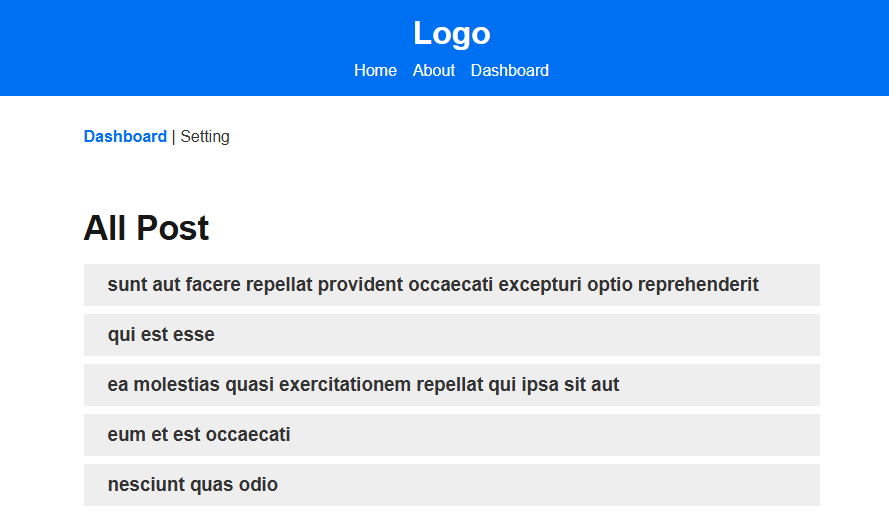
1. Sửa trang Dashboard
import styles from "../../styles/app.module.scss";
import Link from "next/link";
import { Suspense } from "react";

async function getData() {
  const res = await fetch('https://jsonplaceholder.typicode.com/posts');
  if (!res.ok){
    throw new Error('Fail to fetch data');
  }
  return res.json();
}

export default async function Dashboard() {

  const data = await getData();

  return (
    <main className={styles.main}>
      <h1 className={styles.title}>All Post</h1>
      <Suspense fallback={<div>Loading...</div>}>
        {(data || []).map((item: any) => (
          <Link href={'/dashboard/' + item?.userId}>
            <div className={styles.single}>
              <h3>{item?.title}</h3>
            </div>
          </Link>
        ))}
      </Suspense>
    </main>
  );
}
2. Sửa file SCSS Module App thêm class .single
Tạo file Module App đồng thời xóa file page.module.css
.main {
    max-width: 800px;
    margin: 0 auto;
    padding: 2rem;

    a {
        color: #333;
        text-decoration: none;

        &.active {
            font-weight: bold;
            color: #0070f3;
        }
    }
}

.title {
    font-size: 2.1rem;
    font-weight: bold;
    margin-bottom: 1rem;
}

.description {
    font-size: 1.2rem;
    line-height: 1.6;
    color: #555;
    margin-bottom: 1rem;
}

.header {
    background-color: #0070f3;
    padding: 1rem;
    color: white;
    text-align: center;

    h1 {
        margin: 0 0 10px;
        font-size: 2rem;
    }

    a {
        margin: 0 0.5rem;
    }

}

.footer {
    background-color: #f1f1f1;
    padding: 1rem;
    text-align: center;
    color: #333;
}

.btn {
    background-color: #0070f3;
    color: white;
    border: none;
    padding: 0.5rem 1rem;
    border-radius: 5px;
    cursor: pointer;
    font-size: 1rem;

    &:hover {
        background-color: #005bb5;
    }
}
.single {
    padding: 10px 16px;
    background: #eee;
    display: block;
    margin: 8px 0;
    border-left: 8px solid #eee;
    &:hover{
        border-left: 8px solid #005bb5;
    }
}